



Keeping your payment information up to date is the best way to ensure your server stays online without any unexpected interruptions. Whether you got a new card or just want to switch over to PayPal, updating your billing details on MintServers only takes a few seconds.
Let us walk through the dashboard and get those details updated!
ℹ️ Important Note
Updating your payment method here will automatically apply the new card or account to all future renewals for this specific service.
Steps to Update Your Payment Details
- Log into your MintServers Dashboard.
- Navigate to the Manage section for your active server.
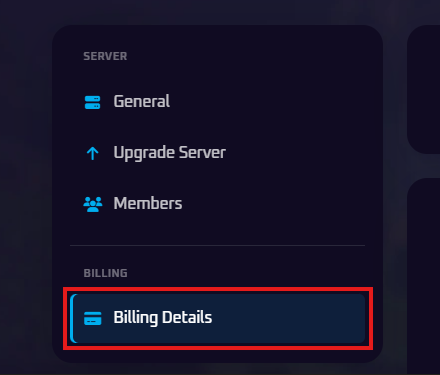
- On the left-hand sidebar, look under the Billing category and click on the Billing Details tab.
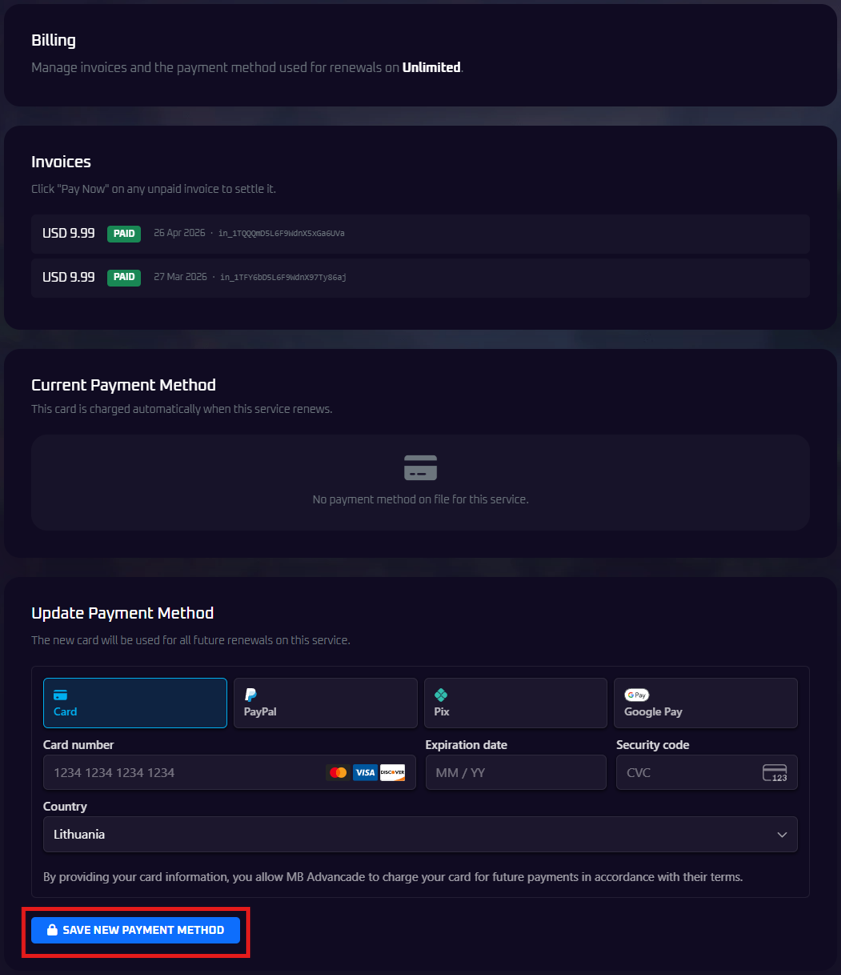
- Scroll down the page until you see the Update Payment Method section.
- Select your preferred payment option from the tabs provided (Card, PayPal, Pix, or Google Pay).
- Enter your new billing information carefully.
- Click the blue Save New Payment Method button to lock in your changes.

🛠️ Managing Unpaid Invoices
If you have a past-due invoice because your previous payment method failed, updating your card in this menu will not automatically pay the old invoice. You will need to scroll up to the Invoices section on the same page and manually click "Pay Now" on the unpaid invoice to settle the balance.
No worries if you are running into errors saving your new card! Just open a support ticket and our billing team will gladly jump in to help you get it sorted out.