



Taking a break from your server? MintServers allows you to pause your service and securely store your files for up to 6 months, completely free of charge! When you are ready to jump back into the action, getting your server back online is incredibly simple.
Let us walk through exactly what happens when you unpause your service and how to get everything running again.
How To Unpause Your Server
When you visit your paused server on the panel, you will see a large notification banner displaying exactly when your service was paused and the final date before your files are permanently deleted. To resume access:
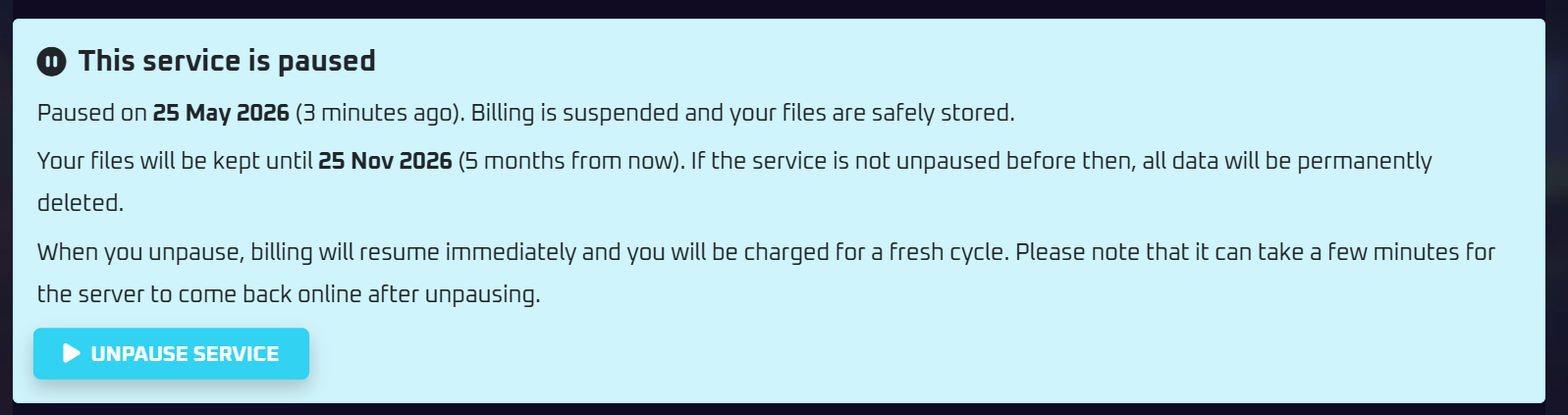
- Log into your MintServers billing and management panel.
- Navigate to the specific service that is currently paused.
- Click the bright blue Unpause Service button located at the bottom of the notification banner.

What Happens Next?
- Billing Resumes: The moment you click the unpause button, your billing cycle reactivates. You will be immediately charged for your next payment period.
- Server Preparation: We have to pull your files out of deep storage and allocate them back to an active node. This process usually only takes a few minutes, but for larger servers, it can take up to 30 minutes to fully complete.
🛠️ Still Waiting?
If it has been longer than 30 minutes since you unpaused and your server is still not accessible, please do not panic! Just open a support ticket and our team will gladly jump in to manually push the activation through for you.