Whether you want to switch to a longer billing cycle to take advantage of our discounted rates, or drop down to a monthly plan for more flexibility, changing your server's billing period is incredibly quick and easy!
You can manage your renewal frequency directly from your MintServers client area. Here is exactly how to do it:
Step-by-Step Instructions
- Log into your MintServers account and navigate to your Dashboard.
- Locate and click on the specific Order or service you want to modify.
- Click the Manage button.
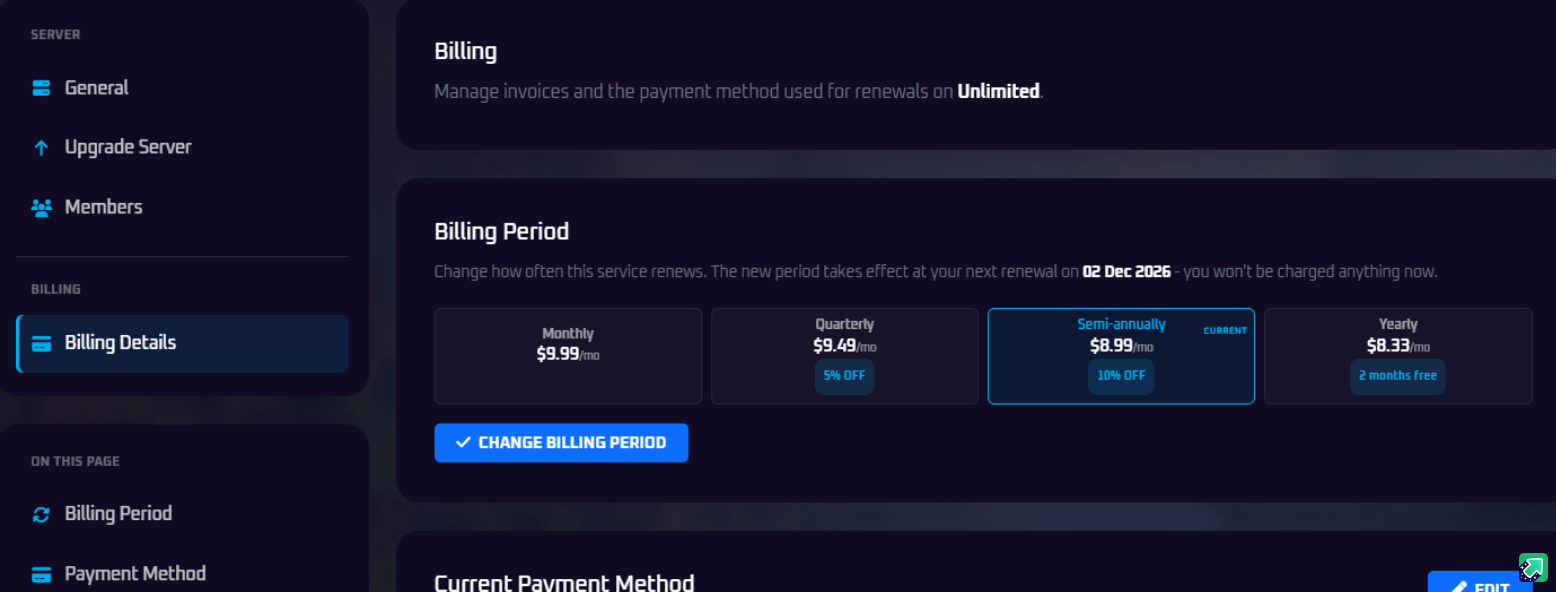
- On the left-hand sidebar, look under the Billing category and click on Billing Details.
- In the Billing Period panel, you will see all the available renewal options (such as Monthly, Quarterly, Semi-annually, or Yearly). Click on your desired billing cycle.
- Click the blue Change Billing Period button to save your new settings!
💡 Note About Billing Changes
When you change your billing period, you will not be charged immediately! The new billing cycle and its associated cost will automatically take effect on your next scheduled renewal date.
When you change your billing period, you will not be charged immediately! The new billing cycle and its associated cost will automatically take effect on your next scheduled renewal date.