



If you need to cancel your MintServers service, it is important to know the steps to protect your data and understand the process. This guide provides a complete walkthrough, from backing up your essential files to submitting the cancellation request through the client dashboard, ensuring a smooth process.
Before proceeding, take a moment to secure your data. All server data is permanently deleted 14 days after an overdue payment or 24 hours after an immediate cancellation. Use the Game Panel to create a backup and download your files. Be sure to save your world files, player data, configs, and any custom mods or plugins!
How to Cancel Your Service
The cancellation process is handled directly through your MintServers billing dashboard.
- Log into your account at the MintServers Dashboard and select the server you wish to cancel. Click the Manage button.
- On the subscription page, click the Manage Subscription button.
- In the Manage Subscription popup, click Cancel Subscription.

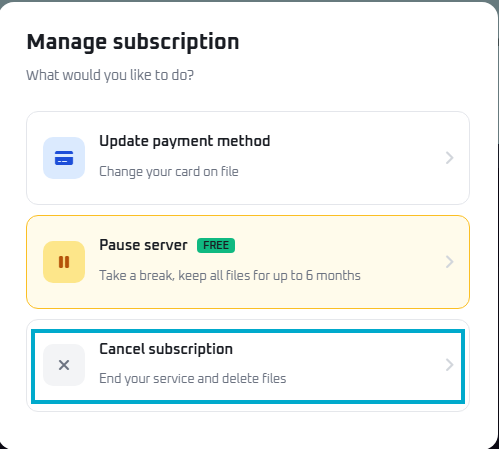
If you are not sure you want to cancel for good, the same popup has a Pause Server option. Pausing is free and keeps all of your files safe for up to 6 months, so you can pick up right where you left off later.
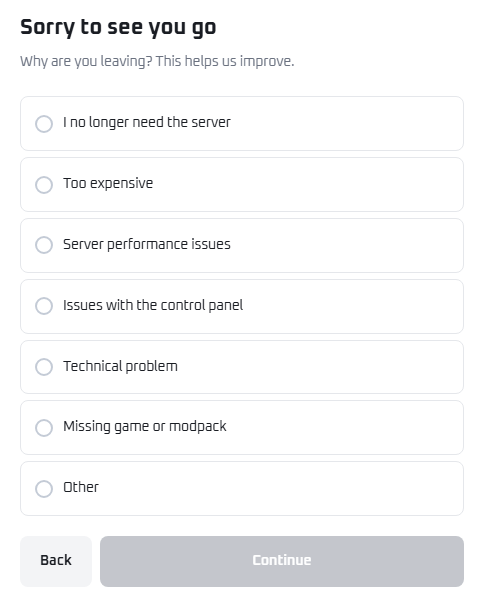
- You will be asked why you are leaving. Select the reason that best applies (or choose Other) and click Continue.
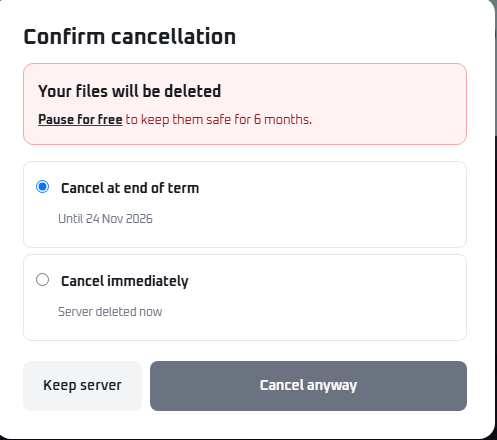
- On the Confirm Cancellation screen, choose when the cancellation should take effect:
- Cancel at end of term: Your server remains active until your current billing period ends.
- Cancel immediately: Your service and all files are deleted right away.
- Click Cancel Anyway to finalize the request. You will receive a confirmation email shortly after.

Important Policies and Information
ℹ️ Good To Know
- Refund Policy: Refunds are only available within 24 hours of the initial purchase. Renewal payments are non-refundable.
- Resuming Service: If you submit a cancellation request for the end of your term and change your mind, you can easily reverse it. Check out our guide on How to Resume a Canceled Service.
- Data Deletion Reminder: Remember, choosing "Cancel immediately" means your server will be terminated within 24 hours after confirming, while "Cancel at end of term" terminates the service at the very end of your billing period. Please make sure to download your server files before the service is terminated!
Need Help?
We understand that circumstances change, and we are here to make the cancellation process as smooth as possible. However, if you are running into technical trouble, performance issues, or have billing questions, our 24/7 support team may be able to help solve the problem without needing to cancel!
Our team is always available to assist you with backup assistance, lag optimization, and modpack configuration. Just join our Discord Support Server or open a billing ticket for immediate assistance. If you decide to leave and return in the future, we will be incredibly happy to assist you in setting up a new server.