



 Runescape: Dragonwilds
RuneScape: Dragonwilds doesn't have official mod support, but the community has built up a healthy library on Nexus Mods and a good chunk of it runs on a dedicated server. The catch is that not every mod can. This guide explains the one distinction that matters, then walks through installing a mod on your MintServers server and checking that it loaded.
Two Kinds of Mods, Only One Works on the Server
Dragonwilds mods on Nexus come in two forms, and the mod page usually tells you which in the installation notes.
Pak mods are .pak files (sometimes with a matching .utoc and .ucas). They replace or tweak game data: carry weight, stack sizes, drop rates, textures. These are plain Unreal Engine content files and the server loads them without any extra framework. This is the kind you can install on your MintServers server.
UE4SS (Lua) mods are scripts that need the UE4SS framework installed underneath them. UE4SS works by hooking into the Windows game executable, and Dragonwilds dedicated servers run the Linux build, so it cannot load on the server at all. Uploading it does nothing; there's no error, it simply never runs. These mods are for the game on your own PC only.
ue4ss, Mods.txt, dwmapi.dll, or the Binaries/Win64 folder, it's a UE4SS mod and won't work on the server. Look for mods whose instructions point at Content/Paks/~mods instead.
Installing a Pak Mod
We'll use GreaterCarryCapacity as the example since it's small and the result is easy to see in-game, but the steps are the same for any pak mod.
Step 1: Download the Mod
- Open the mod page on Nexus Mods and go to the Files tab. You'll need a free Nexus account to download.
- Download the version you want and unzip it on your PC.
- Inside you'll find one or more files ending in
.pak, and possibly.utocand.ucasfiles with the same name. Keep them together; they're one mod.
Step 2: Upload It to the Server
- Log into your MintServers panel and open your Dragonwilds server.
- On the Console tab, click Stop and wait for the server to go offline.
- Click the Files tab and browse to
RSDragonwilds/Content/Paks. - If there's no
~modsfolder yet, create one. The name must be exactly~mods, tilde included. - Open
~modsand upload the mod's.pak(and.utoc/.ucasif it has them) straight into it. Don't put them in a subfolder.
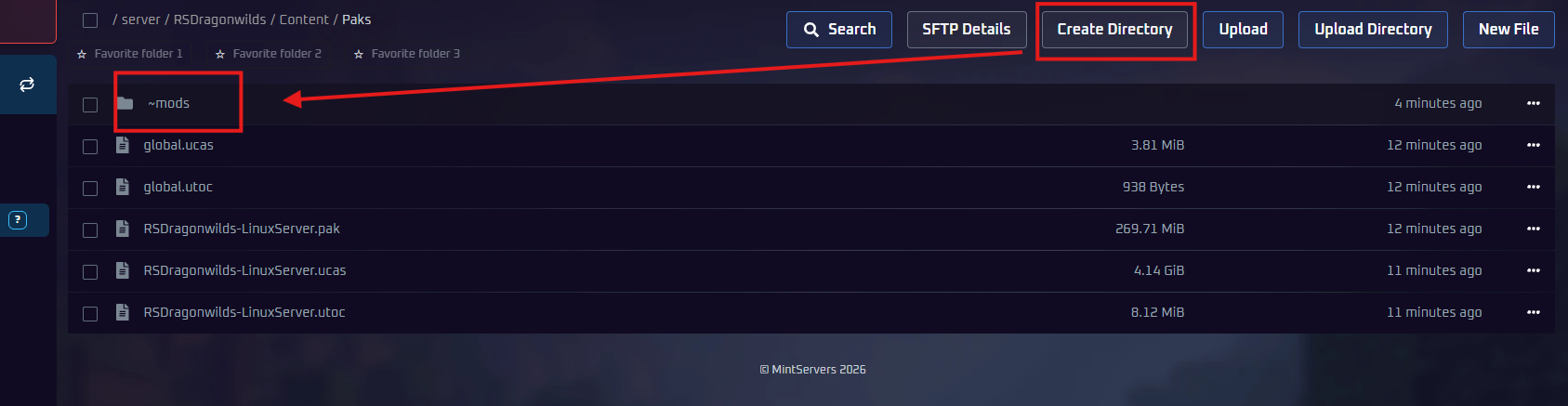
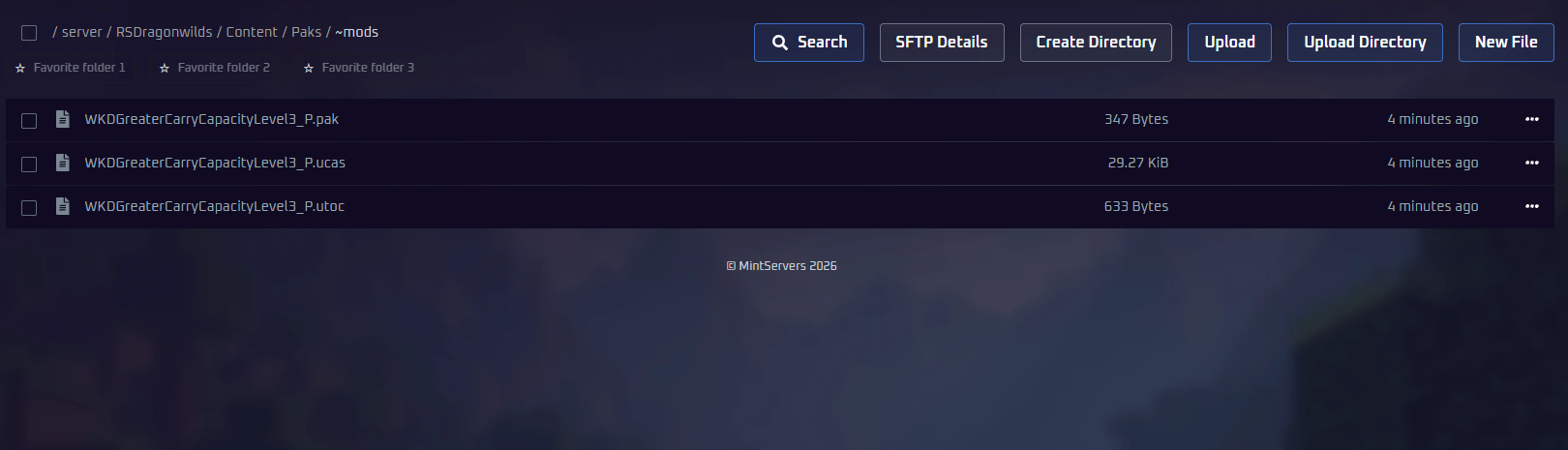
📁 RSDragonwilds
📁 Content
📁 Paks
📁 ~mods (create this folder)
Step 3: Start and Check
- Go back to the Console tab and click Start.
- Wait for
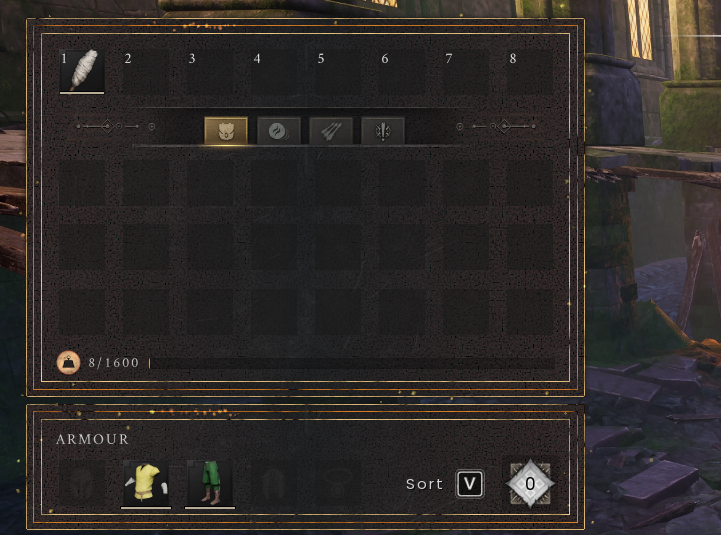
START SESSION - Successin the console. - Join the world and check for the mod's effect. With GreaterCarryCapacity Level 3, opening your inventory shows the weight cap at 1600 instead of the default 400.
Do Players Need the Mod Too?
For a mod like GreaterCarryCapacity, no. It was installed on the server only and the higher cap applied to everyone who joined. That's how it goes for most mods that change numbers and rules, because the server owns that data.
Mods that change what players see (textures, models, UI, sounds) are different. The server has nothing to draw, so each player needs the same pak in their own game for the change to show up. On a PC that's the matching folder inside the Steam install:
If you aren't sure which kind a mod is, install it on the server first, join, and see if it works. If it doesn't, add it to your local game as well.
Removing a Mod
Stop the server, delete the mod's files from ~mods, and start it again. The world itself isn't changed by removing a mod, though anything the mod let you do (like carrying more than the normal cap) will snap back to default.
~mods and starting again. If that fixes it, check Nexus for updated versions of your mods. How to Update Your Dragonwilds Server After a Game Patch covers how updates work.
🛠️ Troubleshooting Mod Problems
Mod has no effect in-game:Confirm the files sit directly in~mods, not in a folder inside it, and that the server was fully stopped when you uploaded. Then check whether the mod is a UE4SS mod; those never load on the server.Server won't start after adding a mod:Stop, remove the newest mod, start. If that fixes it, the mod is broken or built for a different game version. Check the console log for the name of the file it choked on.Uploaded UE4SS and nothing happened:Expected. UE4SS only works in the Windows game client. Install it on your own PC if you want those mods, and understand they only affect you.Mod worked yesterday, not today:A game patch most likely landed. Look for an updated version of the mod on Nexus.
Related Guides
- Keep the server on the current game build: How to Update Your Dragonwilds Server After a Game Patch
- Get custom world rules without mods: How to Upload an Existing World or Use Custom World Settings
- Back up before experimenting: How to Back Up Your Dragonwilds Server World or Start a Fresh One
Stick to pak mods, drop them in ~mods, and restart: that's the whole process. If you run into any trouble, no worries! Just open a support ticket and our team will gladly help you get it sorted out.