



 Minecraft Bedrock
Experiments switch on Bedrock features that are still in development. Turn them on in a few clicks from your panel!
⚠️ Important Warning:
Experiments can crash or break your world, and they cannot be undone for that world. Achievements are turned off too. Always make a backup first!
Experiments can crash or break your world, and they cannot be undone for that world. Achievements are turned off too. Always make a backup first!
💾
1. Backup
Make a backup
🛑
2. Stop
Stop your server
🧪
3. Toggle
Switch on your experiments
▶️
4. Start
Start your server
Step 1: Make a Backup
- Click
Backupsin the left sidebar. - Create a new backup and wait for it to finish.
💡 Pro Tip:
Want backups to happen on their own? See how to set up automated backups.
Step 2: Stop Your Server and Open Experiments
- On the
Consolepage, clickStop. Wait until it showsOffline. - In the left sidebar, open
Bedrock Settingsand clickExperiments.
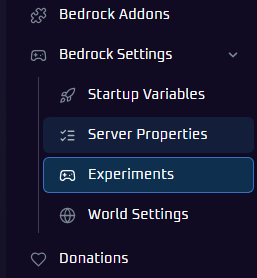
Step 3: Turn On Your Experiments
- Under
Select World, pick the world you want to change. Experiments are set per world. - Click the toggle next to each experiment you want. Use
Search settingsto find one by name.
💡 Pro Tip:
Only turn on what you need. If an add-on names an experiment, enable just that one. Add-ons with beta scripting need
Beta APIs.
Step 4: Start Your Server
Click Start, join your server, and try out your new features!
📝 Already Have a World With Experiments?
Bring your singleplayer world over with our guide to uploading a Bedrock world.
Available Experiments
The list changes as Minecraft updates. Here is what is available right now.
Gameplay
Villager Trade Rebalancing
Updated, rebalanced villager trades.
Drop 3 2025
Features from the 2025 Drop 3 update.
Add-Ons and Creators
Beta APIs
Lets add-ons use beta scripting APIs, including GameTest.
Upcoming Creator Features
Creator features still being tested.
Experimental Creator Camera Features
The latest experimental camera tools.
Custom Biomes
Custom biomes and world generation through JSON.
Data-Driven Jigsaw Structures
Loads jigsaw structures from add-on files.
🛠️ Troubleshooting Tips
- Cannot find Experiments? It is under
Bedrock Settingsand only shows on Minecraft Bedrock servers. Check your current game is Bedrock. - Add-on not working? Check which experiments it needs, make sure they are on for the world your server uses, then restart.
- World crashing or acting strange? This can happen with experiments. Restore your backup from the
Backupstab. - Experiment not listed? The list changes with Minecraft updates, so some come and go.
Still stuck? No worries! Just open a support ticket and our team will gladly jump in and help.