



 StarRupture
Once your StarRupture server is running, connecting to it in-game only takes a minute. StarRupture does not have a server list for dedicated servers, so you join directly using your server's IP address and port. This guide shows you where to find them and how to enter them.
⚠️ Important Warning:
Before the first start, make sure to create your world! See our StarRupture Create or Load a World guide.
Step 1: Find Your Server's IP and Port
Before opening the game, grab your connection details from your MintServers panel.
- Log into your MintServers panel and open your StarRupture server.
- On the Console tab, note the Address and Port listed at the top of the page.
- Combine them into one address separated by a colon, in the format
IP:PORT.

Step 2: Join Through Dedicated Server
- Launch StarRupture and click Join Game in the main menu.

- Click Dedicated Server.
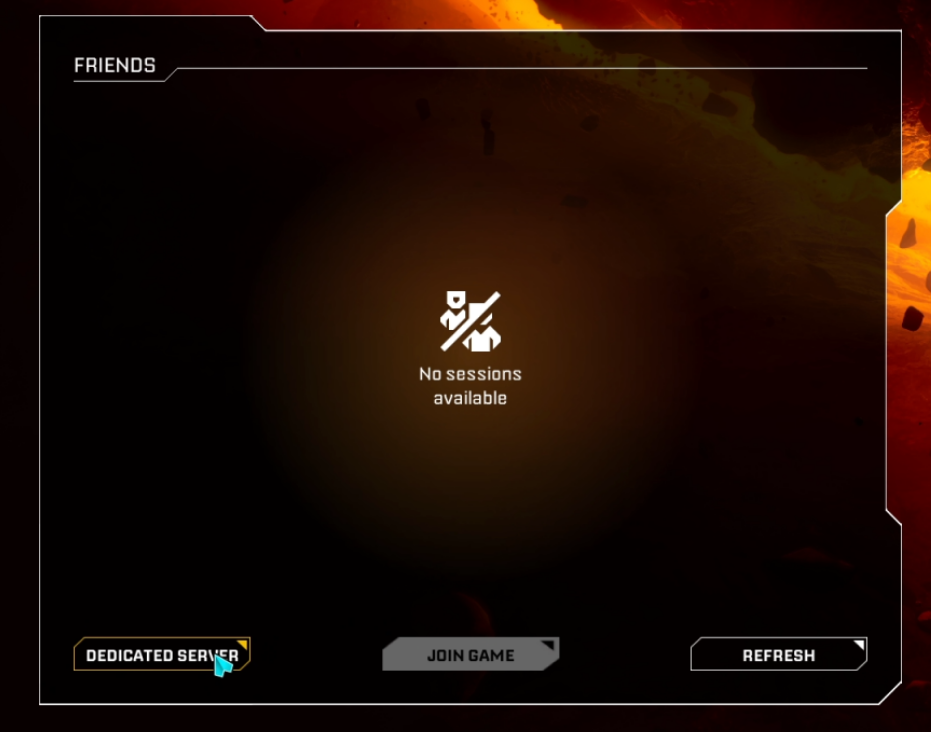
- In the Join Session window, type your server's
IP:PORTinto the Find session via IP field and click Confirm.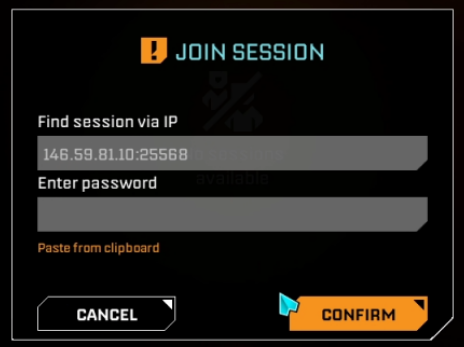
📌 Note:
If you have set a Player password on your server, enter it in the Enter password field as well. Don't have one yet? See our StarRupture Set a Password guide.
🛠️ Troubleshooting Connection Issues
I cannot find my server in a list:Dedicated servers do not show up in a server browser. Use Join Game, then Dedicated Server, and enter your IP and port.Connection fails:Double-check that the address is typed exactly asIP:PORT, with a colon and no extra spaces, and that your server shows as running on the MintServers panel.The server is running but I cannot get into a world:The world has to be created before the first start. Follow our StarRupture Create or Load a World guide.The password is rejected:Enter the Player password, not the Admin password. If you are unsure what it is, you can set a new one with our StarRupture Set a Password guide.
That's it, you're in! If you run into any trouble getting connected, no worries! Just open a support ticket and our team will gladly help you get into the game.