If you are tired of making your players type out a long, random five-digit port number at the end of your server address just to join your game, you are likely searching for a Dedicated IP. It is the ultimate solution for making your server look professional and incredibly easy to join!
Let us break down exactly how this feature works on MintServers, why you want it, and how it simplifies setting up your custom domains.
Dedicated IPs vs. Dedicated Ports
Because MintServers provides premium shared hosting, a single IP address is actually shared through the entire physical node. To make sure network traffic goes to the right place, each server is randomly assigned a unique custom port (for example, 192.168.1.1:25666). Because of this shared architecture, we do not offer traditional "Dedicated IPs."
Instead, we offer something that achieves the exact same result: Dedicated Ports!
Many games have a default port that the game client automatically searches for. If you upgrade to a Dedicated Port, your server gets to use that default number. Because the game client looks for this number automatically, your players do not have to type the port number at all! They can simply type the base IP address and jump right in.
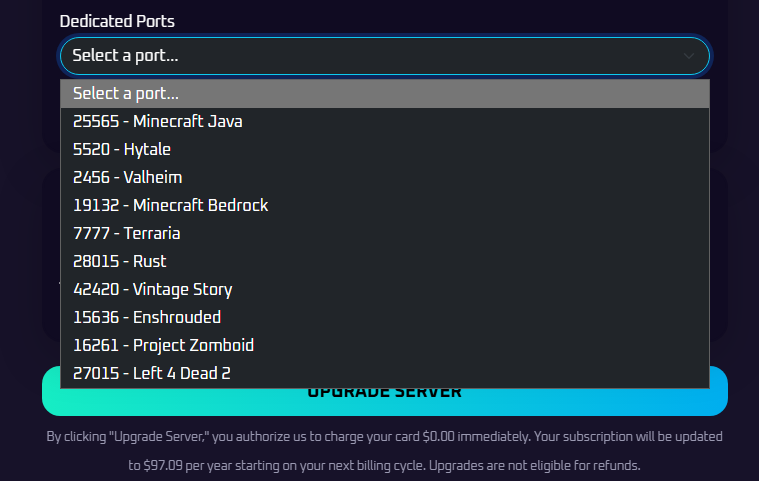
- Minecraft Java:
25565 - Minecraft Bedrock:
19132 - Hytale:
5520 - Valheim:
2456 - Terraria:
7777 - Rust:
28015 - Vintage Story:
42420 - Enshrouded:
15636 - Project Zomboid:
16261 - Left 4 Dead 2:
27015
Setting Up Custom Domains Made Easy
The absolute best benefit of having a Dedicated Port is how it simplifies creating custom domains (like play.yourserver.com).
Normally, if you have a random port, you are forced to set up complex SRV Records with your domain provider to point your domain to the correct port. With a Dedicated Port, you can skip the SRV record entirely!
If your server uses its game's default port, you only need to create a simple A Record pointing to your server's numerical IP address. That is it! Your players can type your clean custom domain and jump right in. For a full step-by-step walkthrough, check out our guide on How To Connect A Custom Domain Using Cloudflare!
How To Upgrade
MintServers offers Dedicated Ports as an awesome add-on feature for your server! It gives you the exact same professional-looking connection address and domain benefits as a Dedicated IP.
To grab a dedicated port for your server, simply navigate to your MintServers billing area, select your active service, and look for the available upgrade options to add a dedicated port to your plan. Once activated, you can select your specific game from the dropdown menu to be assigned the correct default port, and you will be ready to set up your easy A Records!