



 Minecraft Bedrock
Behavior and texture packs let you change mobs, add custom items, and so much more on your Bedrock server. Just drag your pack into your panel and it is added automatically!
Always stop your server before adding packs or editing world files, or your world could get corrupted!
Method 1: Bedrock Addons Tab (Recommended)
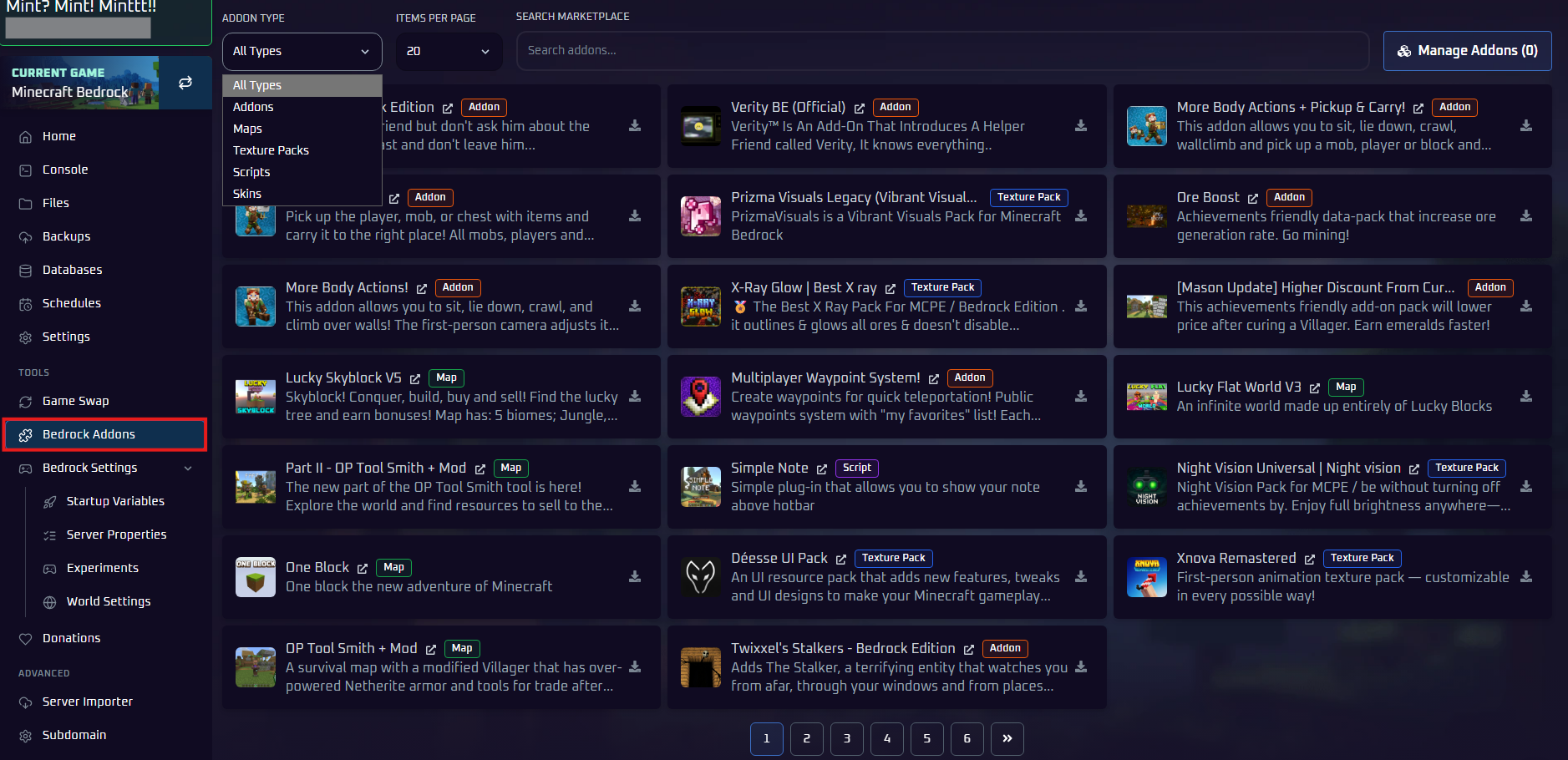
Step 1: Stop Your Server and Open Bedrock Addons
- On the
Consolepage, clickStop. - In the left sidebar, under
Tools, clickBedrock Addons.
Step 2: Add Your Pack
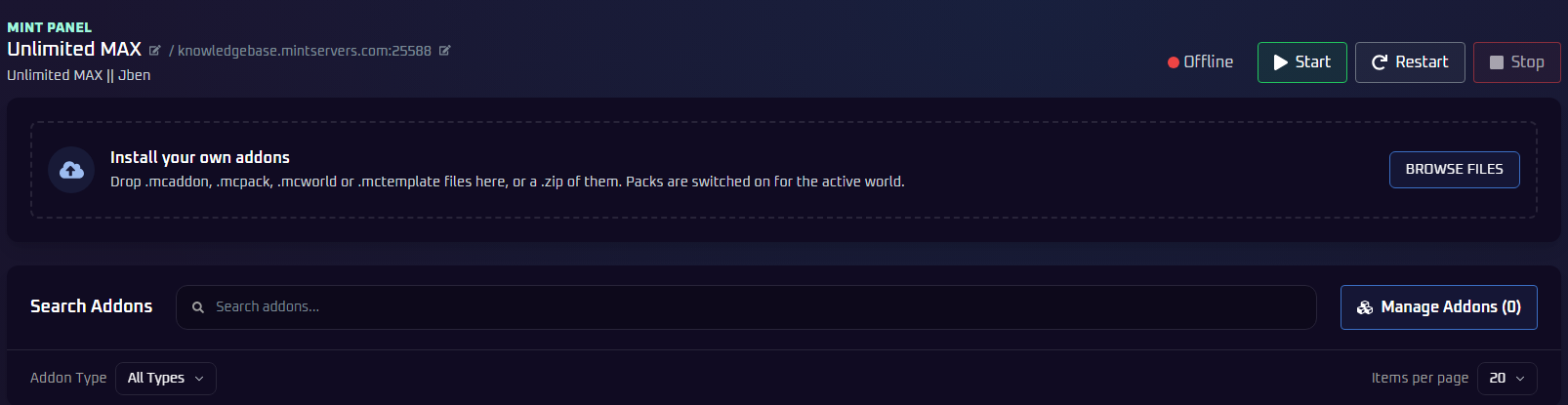
Option A: Drag & Drop Your Own Pack (Easiest)
- Find the
Install your own addonsbox at the top of the page. - Drag your pack file onto the box, or click
Browse Filesand pick it. - That is it! Packs are switched on for your active world automatically.
Option B: Install From the Library
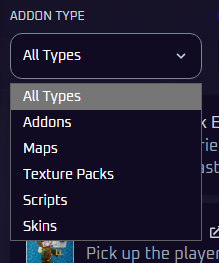
- Pick a type with the
Addon Typedropdown, or type a name intoSearch addons... - Click the download icon on the pack you want.
- To review or remove packs, click
Manage Addonsat the top right.
Step 3: Start Your Server
Go back to the Console tab and click Start. Your world will load with your new packs!
Method 2: Install a Pack Manually
Prefer to do it by hand? This method links the pack to your world file yourself. Our free Pack Checker tells you exactly where everything goes.
Step 1: Download Your Pack
Download the Bedrock version of your pack from a site like MCPEDL. It will be a .mcpack, .mcaddon or .zip file. Do not extract it yet!
Step 2: Check Your Pack (Optional)
Drop your file into the Pack Checker to see if it works on Bedrock, which folder it goes in, and what to paste into your world file.
The Pack Checker needs JavaScript to run. If it does not load, no worries! Just follow the manual steps below instead.
Or follow the next two steps to do it yourself.
Step 3: Extract and Upload the Pack
- Rename your
.mcpackor.mcaddonfile to end in.zip, then extract it. The folder withmanifest.jsoninside is your pack. - Stop your server and open the
Filestab. - Open the
behavior_packsfolder (orresource_packsfor texture packs). - Click
Uploadand upload the whole pack folder.
📁 behavior_packs (or resource_packs)
📁 YourCustomPackFolder
Step 4: Activate the Pack in Your World
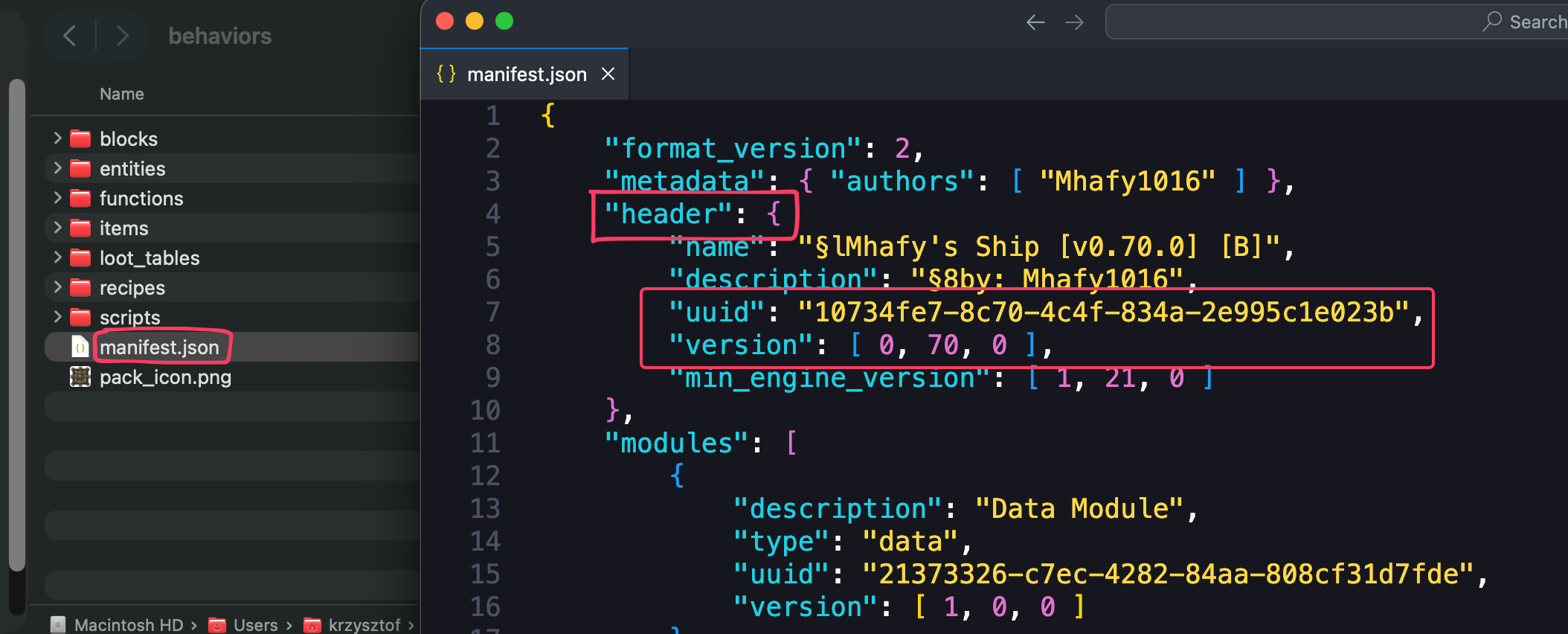
- Open your uploaded pack folder and click
manifest.json. - Copy the
uuidandversionfrom the "header" section.
- Go back to your main files, open
worlds, then your world folder (usuallyBedrock level). - Click
world_behavior_packs.json(orworld_resource_packs.jsonfor texture packs). No file? Create one with that exact name.
📁 worlds
📁 Bedrock level
📄 world_resource_packs.json (Click to edit this file)
- Paste your pack's UUID and version into the file like this:
More than one pack? List them all inside the same [], separated by a comma:
- Click
Save Content. - Go back to the
Consoletab and clickStart. Your packs are now active!
🛠️ Troubleshooting Tips
- Bedrock or Java? Bedrock packs have a
manifest.jsonfile. Java packs havepack.mcmetaand will not work on Bedrock. The Pack Checker can tell you for sure. - Pack not in the library? Drag it into the
Install your own addonsbox in Method 1. - Server will not start or pack is not working: this is usually a JSON typo. One missing comma or bracket breaks the whole file, so paste it into an online JSON validator to check.
- Make sure your pack matches your server's current Bedrock version. Outdated packs often will not work after an update.
Still not loading? No worries! Just open a support ticket and our team will gladly jump in and help.