



 SCP: Secret Laboratory
Your SCP: Secret Laboratory server is up and running, so now it is time to actually get in and play! There are two ways to join: typing your server's address into Direct Connect, or finding it in the in-game server list. This guide walks you through both.
Direct Connect works for any server right away, with no extra setup. The server list only shows servers that have been verified by the SCP: SL team, so use Direct Connect if you are just playing with friends.
Method 1: Joining via Direct Connect
This is the quickest way to join. All you need is your server's domain or its IP address and port.
- Launch SCP: Secret Laboratory and click
Serversin the top menu. - Click the
Direct Connectbutton in the row of buttons above the server list. - Type your server's domain or
IP:PORTinto the Direct Connect box. For example,play.yourdomain.comor123.45.67.89:7777. - Click
Connect.
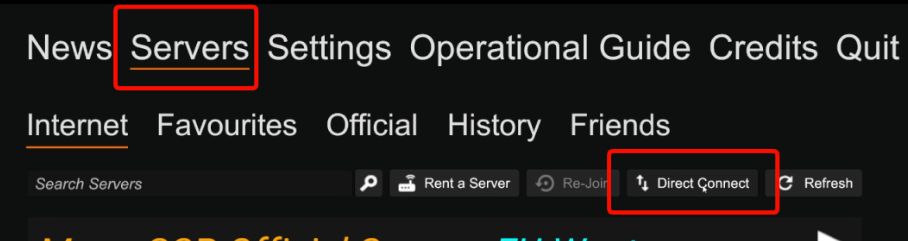
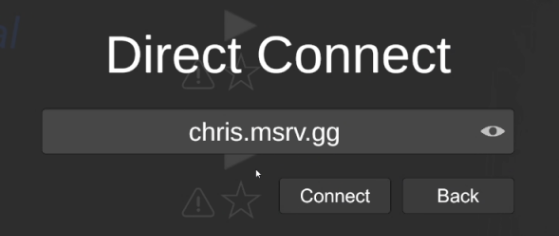
123.45.67.89:7777. You can copy your server's IP and port from your MintServers game panel.

Method 2: Joining via the Server List
If you want your server to show up in the in-game browser, so anyone can search for it by name, follow these steps.
- Verify your server first. Only verified servers appear in the server list, and our Create Server guide walks you through the process.
- Launch SCP: Secret Laboratory and click
Serversin the top menu. - Type your server's name into the search box above the server list.
- Select your server from the results and click the play button (▶) next to it.
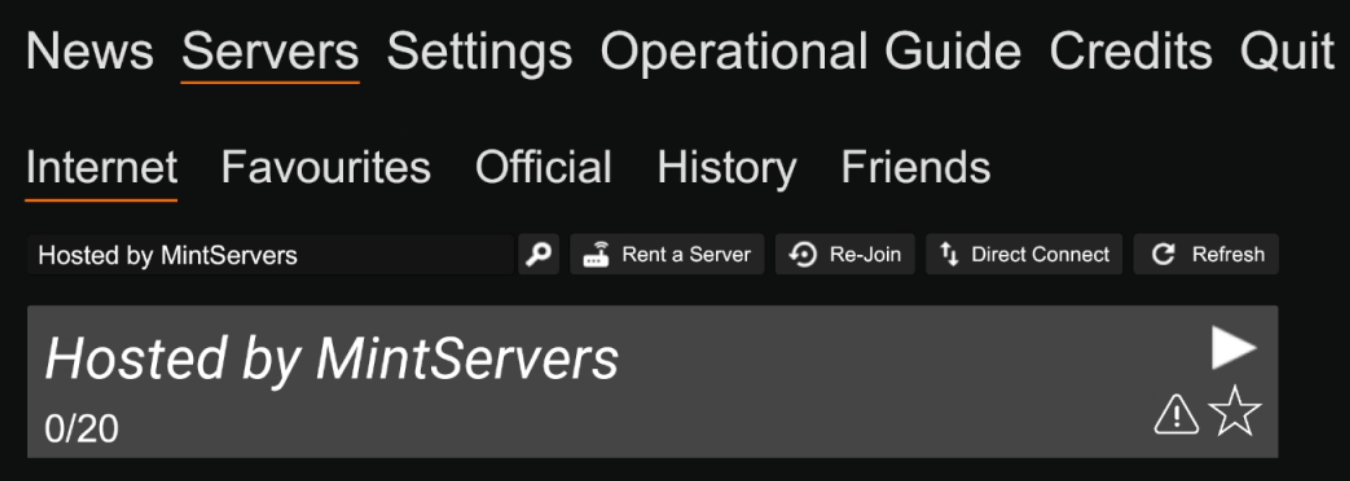
The SCP: SL team designs the verified list for servers that stay online close to 100% of the time and are building a community. If you only host a small server for friends, Direct Connect is usually all you need.
🛠️ Troubleshooting Joining Issues
Server not in the server list:Your server has to be verified before it appears there. Until then, join with Direct Connect instead.Direct Connect fails:Make sure your server is fully started on the MintServers panel, and double-check the address for typos, extra spaces, or a missing colon before the port.Version mismatch:Your game and the server should be on the same SCP: SL version. After a game update, make sure both your game and your server have updated.Can't join a server you own:If the whitelist is turned on, only whitelisted players can join. Check theenable_whitelistsetting inconfig_gameplay.txt.
Once you are in, you are ready to survive the facility! Want to change your server's rules or give your friends admin powers? Check out our Configure Server and Become Admin guides. If you have any trouble getting connected, no worries! Just open a support ticket and our team will gladly jump in and help you out.