



 Hytale
Whether you are building secretly before a big release or just want to play a survival world with close friends, keeping your server private is essential. There are two main ways to secure your Hytale server on MintServers:
Easy to share and great for small groups of friends.
Offers strict control, requiring you to manually approve and add every player.
Let us walk through your MintServers game panel and get your server locked down using either method!
Method 1: Setting a Server Password
The easiest way to lock your server is by adding a password. Anyone who knows the password can join your world.
📁 server (main server directory)
"Password" setting.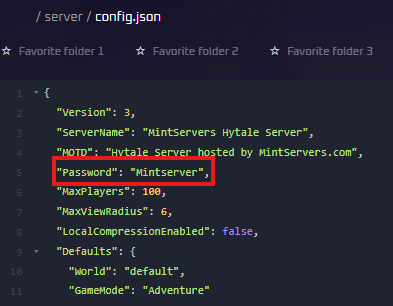

Method 2: Enabling the Whitelist
For stricter security, use a whitelist. When enabled, the server will block everyone except the specific players you manually add to the list.
Step 1: Turn on the Whitelist
You can enable the whitelist directly from your MintServers Console or via the in-game chat if you already have Operator (OP) permissions.
Via Console (Panel):
Via In-Game (Requires OP):

Step 2: Add Players
To allow a player to join, use the add command. You will need to repeat this process for every person you want to allow, including yourself! Replace PlayerName with their exact in-game username.
Via Console (Panel):
Via In-Game (Requires OP):

Removing Players from the Whitelist
If you ever need to revoke access for a player, you can easily remove them using the following command:
whitelist remove PlayerName/whitelist remove PlayerName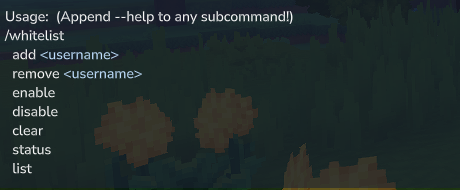
🛠️ Troubleshooting Access Issues
Friends are still getting blocked
If you enabled the whitelist, ensure you typed their names exactly as they appear in-game, as the list is completely case-sensitive!
Still stuck?
Our team is happy to help. Open a ticket through the live chat button in the bottom-right corner of our website, or join our Discord and open a ticket there.
Join our Discord