



Forgot a payment or had a card decline? No worries! Settling an outstanding invoice is a quick process and ensures your server stays online without any hiccups.
Let us walk through the dashboard and get that balance cleared up so you can get back to gaming!
ℹ️ Important Note
If your service was automatically suspended due to a missed payment, successfully paying the outstanding invoice will immediately reactivate your server.
Steps to Pay an Outstanding Invoice
- Log into your MintServers Dashboard.
- Navigate to the Manage section for your active server.
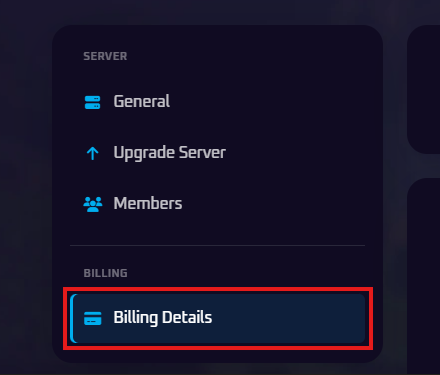
- On the left-hand sidebar, look under the Billing category and click on the Billing Details tab.
- Locate the Invoices section near the top of the page.
- Find your latest unpaid invoice and click the Pay Now button next to it.
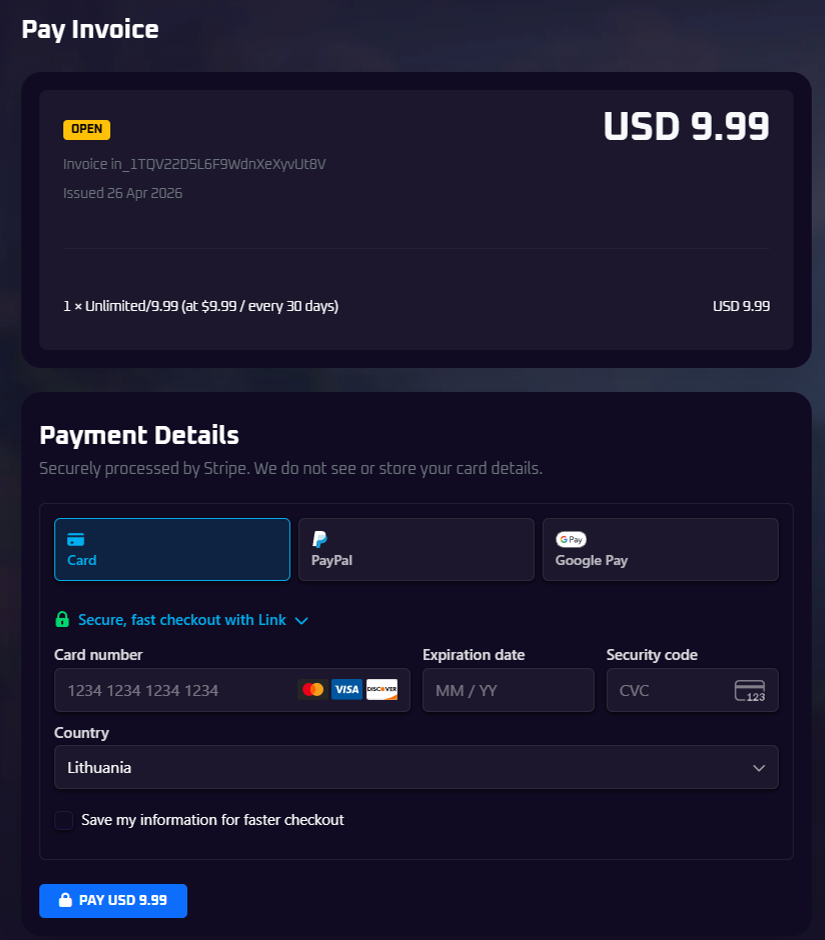
- You will be taken to our secure checkout page. Simply choose your preferred payment method (Card, PayPal, or Google Pay), enter your details, and complete the transaction to settle the balance.

🛠️ Having Trouble Processing Your Payment?
If your payment keeps declining, double-check your bank details or try selecting an alternative payment option during checkout. Remember, you can also scroll down to the "Update Payment Method" section on the Billing Details page to set a new default card for future automatic renewals.
No worries if you are still stuck or your server does not reactivate after paying! Just open a support ticket and our billing team will gladly jump in to fix it up.