



 Necesse
Ready to hop into your Necesse world with friends? Connecting to your dedicated server only takes a minute once you know your server's address. This guide walks you through adding your server to your in-game server list and joining for the first time.
📌 Before You Start:
You will need your server's IP Address and Port. Both can be found in your MintServers panel.
Step 1: Find Your Server's IP and Port
- Log into your MintServers panel and select your Necesse server.
- On the Overview page, note down your server's
IP AddressandPort. The default Necesse port is14159, but yours may differ.
Step 2: Adding and Joining Your Server
- Launch Necesse through Steam.
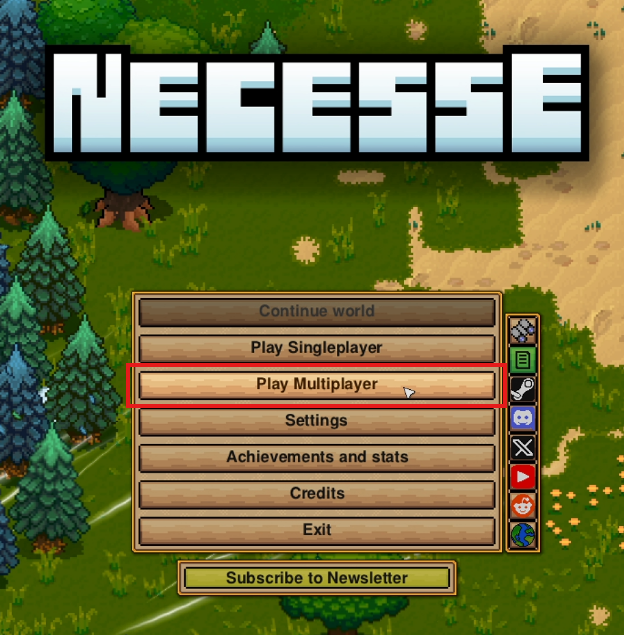
- From the main menu, click
Play Multiplayer. - Click
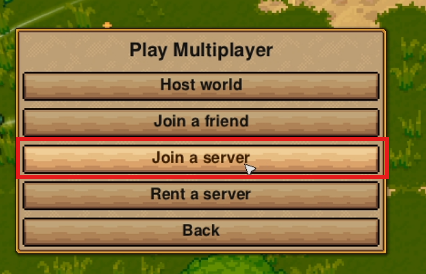
Join a server. - Click
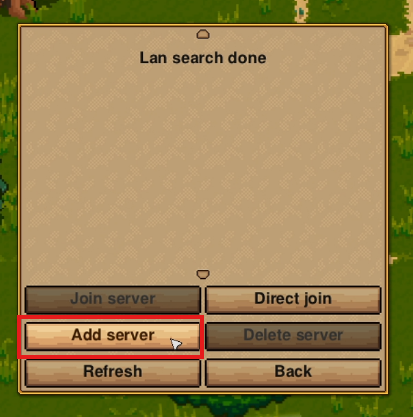
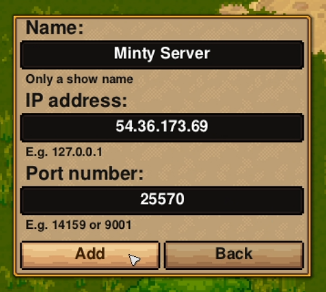
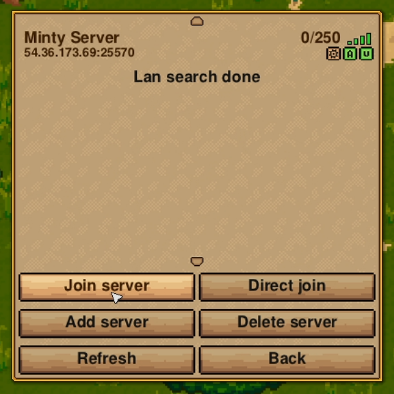
Add server. - Enter a server name (this can be anything you like), then enter your server's
IP AddressandPortseparately. ClickAdd. - Select your newly added server from the list, then click
Join server.
💡 Pro Tip:
If your server has a password set, you will be prompted to enter it before you can join. Once your server is saved to the list, you can rejoin anytime by selecting it and clicking Join server, no need to re-add it.

🛠️ Troubleshooting Connection Issues
Failed to connect:Double-check that the IP Address and Port were entered exactly as shown in your MintServers panel, with no extra spaces.Server not responding:Make sure your server is actually running. Check the Console tab on your panel and start it if it's stopped.Incorrect password:If you're prompted for a password and it's rejected, confirm the password with whoever manages the server, passwords are case-sensitive.
That's it, you're ready to explore with your friends! If you're still having trouble connecting to your server, no worries! Just open a support ticket and our team will gladly jump in and help you get sorted.