



 Aska
Aska
Ready to dive into your Viking village? Joining your Aska server only takes a few clicks. Aska servers are listed in the in-game server browser, so all you need is the name of your server.
This guide walks you through finding and joining your server, and what to check if it does not show up in the list.
Aska supports a maximum of 4 players at the same time.
Step 1: Make Sure Your Server Is Online
Before you launch the game, check that your server is up and running.
- Log into your MintServers panel and open the Console tab.
- If your server is offline, click the Start button and wait for it to finish starting up. A freshly started server can take a moment before it shows up in the server list.
Step 2: Find Your Server In Aska
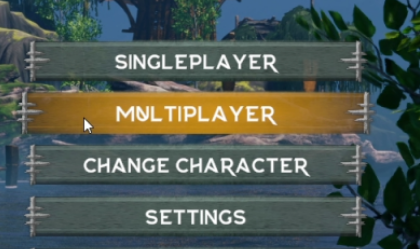
- Launch Aska from Steam and click Multiplayer on the main menu.
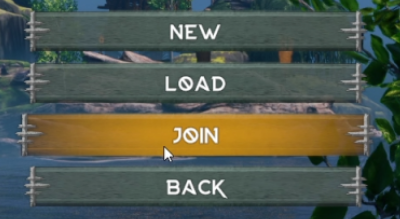
- Click Join.
- Type your server name into the search field. Make sure your GSLT token is set, otherwise your server will not be listed!
- Find your server in the list and select it.
- Click Join to connect.

Joining A Password-Protected Server
If your server has a password, Aska will ask for it when you join. Enter the password and you are in. You can add, change or remove your server's password with the password setting in server properties.txt. Leaving it empty makes your server public. See our Server Configuration guide for details.
🛠️ Troubleshooting Common Join Issues
Server not in the list:The most common cause is a missing or invalid GSLT. The token must be created for the Aska game (App ID 1898300), and the server needs to be restarted after you add it. See the GSLT section of our Server Configuration guide.Server just started:Give the server a minute to finish loading its world, then close and reopen the server list.Different name in the list:If you uploaded an existing save, your server is listed under that world's own name instead of the display name you set. See our Upload an Existing Save guide.Region filter:If you are filtering the server list by region, make sure it matches the region your server is set to.Can't connect:Make sure Aska is fully updated on Steam, and that your server is not already full. Aska supports up to 4 players.Password rejected:Double-check thepasswordvalue inserver properties.txtand try again.
Once you are in, your village is waiting for you. If you cannot find your server after going through the steps above, no worries! Just open a support ticket and our team will gladly jump in and get you connected.